
- Home
- About Us
- Contact Us
- Biography
- MedBound Hub
- InternshipInternship
- Daily Pulse
- Medicine
- Physical Therapy
- InterviewInterview
- Pharmacy
- Biotechnology
- College/InstituteCollege/Institute
- Dentistry
- Blog
- Wellness & Nutrition
- Nursing
- Opinion

In today's digital world, computer use has become an essential part of everyday life. Whether you're a student attending online classes, an IT professional writing code, a doctor updating electronic medical records, a police officer preparing reports, a researcher analyzing data, or an office employee managing spreadsheets, chances are you spend several hours each day in front of a computer. While technology has made work more efficient, it has also led to a significant increase in prolonged mouse and keyboard use.
Using a computer mouse repeatedly for hours may seem harmless, but over time it can place continuous stress on the muscles, tendons, and nerves of the hand, wrist, forearm, and shoulder. This repetitive strain can contribute to discomfort, fatigue, and work-related musculoskeletal disorders (WRMSDs), particularly among individuals whose jobs involve prolonged computer use.1,2
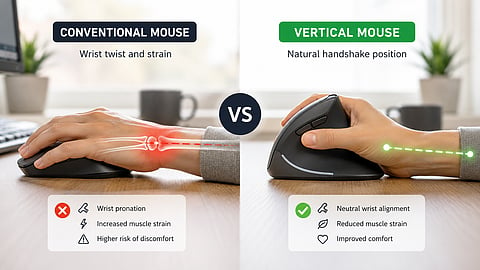
To address these ergonomic challenges, manufacturers have developed the vertical mouse, an alternative to the traditional computer mouse that allows the hand to rest in a natural, handshake-like position. Unlike a conventional mouse, which requires the forearm to rotate inward with the palm facing downward, a vertical mouse is designed to reduce excessive forearm pronation and encourage a more neutral wrist posture.
But does changing the shape of your mouse really make a difference?
A vertical mouse is an ergonomic computer mouse that allows users to hold the device in a handshake-like position rather than placing the palm flat against the desk. Unlike traditional mice, which require the forearm to rotate inward (pronation), a vertical mouse keeps the wrist and forearm closer to their natural resting alignment.
This design changes how the hand grips the mouse and how the forearm muscles work during computer tasks. By reducing the amount of forearm pronation and wrist deviation, a vertical mouse aims to decrease mechanical stress on muscles, tendons, and joints involved in repetitive mouse movements.1
Although several models are available, most vertical mice are angled between 57° and 90°, allowing users to choose a grip that feels comfortable while maintaining a more neutral wrist posture.
Prolonged mouse use involves repetitive clicking, sustained gripping, and continuous activation of the forearm muscles, which can lead to muscle fatigue and discomfort over time.
Research has associated extended computer use with wrist pain, forearm fatigue, shoulder and neck discomfort, hand stiffness, tendon irritation, carpal tunnel syndrome, and other repetitive strain injuries. While these conditions have multiple causes, poor workstation ergonomics and prolonged static postures are recognized as important occupational risk factors.2
When using a conventional computer mouse, the forearm is typically rotated so the palm faces downward. This movement, known as pronation, is normal for short periods but may become problematic when maintained continuously for several hours.
In this posture:
The radius crosses over the ulna.
The wrist often deviates outward.
Wrist extensor muscles remain active to stabilize the hand.
The shoulder may rotate internally to support the arm.
Maintaining these positions throughout the workday increases muscular effort and places continuous load on soft tissues surrounding the wrist and forearm.
Studies using electromyography (EMG) have shown that vertical mice require less activation of the wrist extensor muscles than conventional mice. Research found significantly lower muscle activity in users of a vertical mouse, suggesting reduced muscular effort during routine computer tasks.1
Lower muscle activity does not indicate weaker muscles; rather, it means the muscles work more efficiently, which may help reduce fatigue during prolonged computer use. Similar findings have been reported in other ergonomic studies, with users experiencing lower muscular load after adapting to a vertical mouse.4
Carpal tunnel syndrome (CTS) occurs when the median nerve is compressed at the wrist, causing symptoms such as numbness, tingling, pain, and hand weakness. Although prolonged computer use may contribute to CTS, the condition has multiple risk factors, including repetitive hand movements, forceful gripping, obesity, diabetes, pregnancy, and other medical conditions.3
While a vertical mouse promotes a more neutral wrist posture and may reduce biomechanical stress, current evidence does not show that it can prevent or treat CTS on its own. Instead, experts recommend using it as part of a comprehensive ergonomic approach that includes proper workstation setup, regular breaks, and stretching exercises.1,2
One of the most consistent findings across ergonomic studies is that a vertical mouse reduces excessive forearm pronation. Keeping the hand closer to a neutral "handshake" position decreases rotational stress on the forearm and promotes a more comfortable wrist alignment.
Electromyographic studies have demonstrated lower activation of wrist extensor muscles when using a vertical mouse. Reduced muscle activity may lessen fatigue during prolonged computer work, particularly for people who spend several hours using a mouse each day.
Many users report reduced wrist and forearm discomfort after adapting to a vertical mouse. Although comfort is subjective and varies between individuals, ergonomic studies consistently show higher satisfaction scores for vertical or angled mouse designs compared with conventional mice after an adjustment period.
Because the wrist, forearm, and elbow remain in a more neutral position, a vertical mouse may also reduce unnecessary strain on the shoulder and upper arm. This improved alignment can contribute to better overall posture during desk work.
A vertical mouse can be a valuable addition to an ergonomic workstation by encouraging a more natural hand and wrist position during computer use. While it is not a standalone solution for preventing musculoskeletal disorders, combining it with proper workstation setup, regular movement breaks, and healthy posture can help improve comfort and support long-term upper-limb health.
1. Quemelo, Paulo R.V., and Edgar Ramos Vieira. 2013. “Biomechanics and Performance When Using a Standard and a Vertical Computer Mouse.” Ergonomics 56 (8): 1336–44. doi:10.1080/00140139.2013.805251.
2. Lourenço, Miguel L., Rui A. Pitarma, and Denis A. Coelho. 2022. "A Design Contribution to Ergonomic PC Mice Development" International Journal of Environmental Research and Public Health 19, no. 13: 8126. https://doi.org/10.3390/ijerph19138126
3. Joshi, Aditya, Karan Patel, Asma Mohamed, Sanket Oak, Michael H. Zhang, Henry Hsiung, Allen Zhang, and Utsav K. Patel. 2022. "Carpal Tunnel Syndrome: Pathophysiology and Comprehensive Guidelines for Clinical Evaluation and Treatment." Cureus 14 (7): e27053. https://doi.org/10.7759/cureus.27053.
4. Odell, Dan, and Peter Johnson. 2015. "Evaluation of Flat, Angled, and Vertical Computer Mice and Their Effects on Wrist Posture, Pointing Performance, and Preference." Work 52 (2): 245–261. https://doi.org/10.3233/WOR-152167
